
• Products
    • BuddyBuilder
    • Visibility Logic for Elementor
    • Woo Addons Upcoming
    • Enhanced Addons Upcoming
  • Blog
  • My Account
  • Products
    • BuddyBuilder
    • Visibility Logic for Elementor
    • Woo Addons Upcoming
    • Enhanced Addons Upcoming
  • Blog
  • My Account

Getting Started

  • Requirements For Stax Theme
  • How to Install the Stax Theme Via WordPress
  • Stax Recommended Plugins
  • How to Install the Stax Theme via FTP
  • Setting up a Stax Child Theme

FAQ

  • Image Sizes
  • How to utilize Visibility Logic plugin within the theme
  • How Can I update the theme

Customizer Settings

  • Stax – Colors
  • Stax – Typography Options
  • Stax- Header
  • Stax – Footer
  • Stax – Layout
  • Stax – Single Post
  • Stax- Single Page
  • Stax – Performance
  • Stax – Archive Listing
  • Stax – 404 Page
  • Stax – Miscellaneous
  • Stax – Menus
  • Stax – Export/Import
  • Stax – Additional CSS
  • Stax- Widgets

Posts and Pages

  • Creating Posts and Pages
  • Stax Options
  • Adding Elementor Templates

How to Guides

  • How to Create and restore Backups to your Website
  • How To Add Custom Fonts

Translation

  • How to Translate the theme with Loco Translate
  • Theme Translation Basics
  • How to Translate the theme with Poedit
  • How to Translate the theme with WPML
  • Multilingual site setup with WPML

Speed and Performance

  • How to Optimize For Speed and Performance

Troubleshooting

  • Basic Troubleshooting
  • Submitting Support Tickets
  • Home
  • Docs
  • Stax Theme
  • Getting Started
View Categories

Requirements For Stax Theme

1 min read

Prior to using the Stax theme, there are various requirements that your WordPress environment and server need to meet in order to avoid common theme installation problems, as well as be in a better position to effectively use the theme.

Stax Theme Recommendations

  • Using the latest version of WordPress
  • PHP version 7.0 or greater. It is however recommendable to use PHP version 7.4 as per the WordPress recommendations and also because PHP versions below 7.3 are no longer supported as can be seen here.
  • MySQL version 5.0 or higher

Recommended PHP Configuration Limits

SettingValue
memory_limit256M
max_execution_time180
upload_max_filesize32M
post_max_size32M
max_input_vars3000

You can have these limits increased on your end or request your hosting provider to have these limits set to the values above.

How to Verify your PHP Limits

For you to verify the set PHP limits, this can be easily achieved by carrying out the following:

  • Install the WP Server Health Stats plugin
  • Navigate to the WP Server Stats > PHP Information section within the WordPress dashboard
  • Within the “Core” section, you can check on the limits as well as their local values and master values. The “Local value” references your installation value, whereas the “master value” references the overall limit provided by your host.
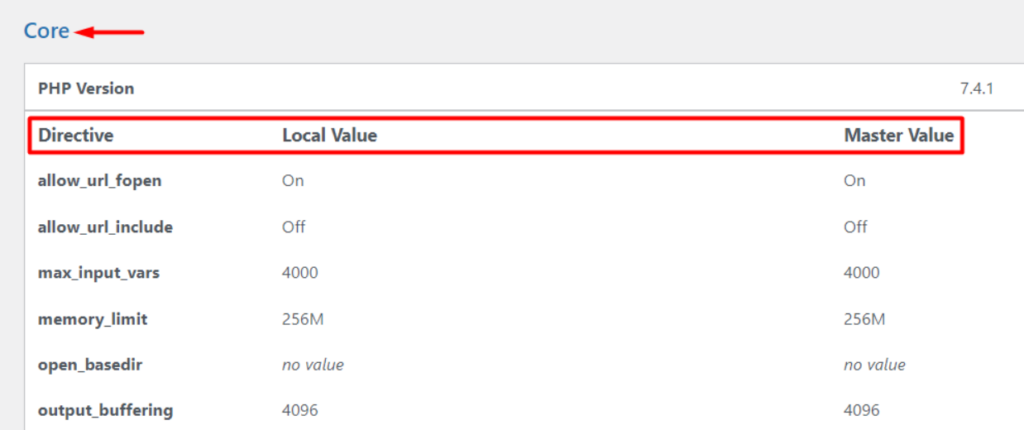
Some hosts try to have these limits set to low values. It is hence important to counter-check on these values so as to ensure that you retain maximum utilization of the limits in comparison to what you are paying for.

What are your Feelings

Share This Article :

  • Facebook
  • X
  • LinkedIn
  • Pinterest
Still stuck? How can we help?

How can we help?

Updated on February 22, 2022
Setting up a Stax Child ThemeHow to Install the Stax Theme Via WordPress
Table of Contents
  • Stax Theme Recommendations
  • Recommended PHP Configuration Limits
  • How to Verify your PHP Limits

Stax Theme | Made with ❤️ by StaxWP