
• Products
    • BuddyBuilder
    • Visibility Logic for Elementor
    • Woo Addons Upcoming
    • Enhanced Addons Upcoming
  • Blog
  • My Account
  • Products
    • BuddyBuilder
    • Visibility Logic for Elementor
    • Woo Addons Upcoming
    • Enhanced Addons Upcoming
  • Blog
  • My Account

Getting Started

  • Requirements For Stax Theme
  • How to Install the Stax Theme Via WordPress
  • Stax Recommended Plugins
  • How to Install the Stax Theme via FTP
  • Setting up a Stax Child Theme

FAQ

  • Image Sizes
  • How to utilize Visibility Logic plugin within the theme
  • How Can I update the theme

Customizer Settings

  • Stax – Colors
  • Stax – Typography Options
  • Stax- Header
  • Stax – Footer
  • Stax – Layout
  • Stax – Single Post
  • Stax- Single Page
  • Stax – Performance
  • Stax – Archive Listing
  • Stax – 404 Page
  • Stax – Miscellaneous
  • Stax – Menus
  • Stax – Export/Import
  • Stax – Additional CSS
  • Stax- Widgets

Posts and Pages

  • Creating Posts and Pages
  • Stax Options
  • Adding Elementor Templates

How to Guides

  • How to Create and restore Backups to your Website
  • How To Add Custom Fonts

Translation

  • How to Translate the theme with Loco Translate
  • Theme Translation Basics
  • How to Translate the theme with Poedit
  • How to Translate the theme with WPML
  • Multilingual site setup with WPML

Speed and Performance

  • How to Optimize For Speed and Performance

Troubleshooting

  • Basic Troubleshooting
  • Submitting Support Tickets
  • Home
  • Docs
  • Stax Theme
  • Customizer Settings
View Categories

Stax – Menus

1 min read

Overview

The Stax theme provides a section to create and update your menus for the various locations provided by the theme. This setting is provided within the Appearance > Customize > Menus section.
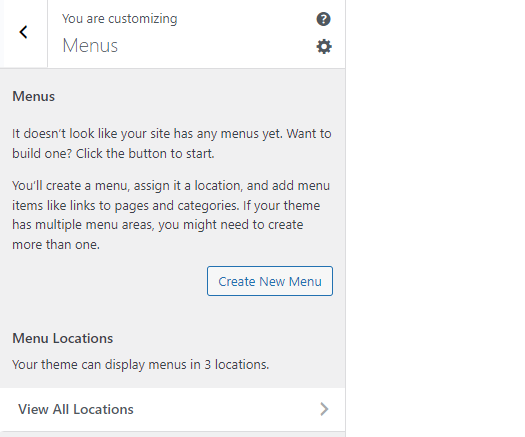
Creating a new Menu

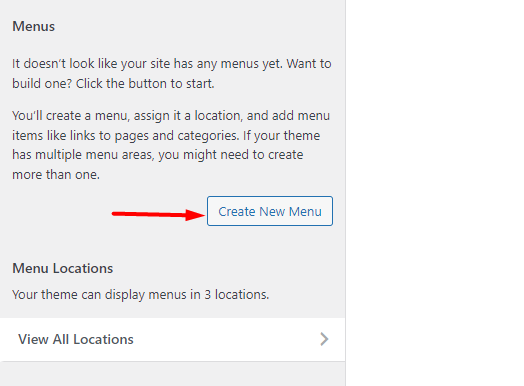
Stax theme provides an option to create a menu for your website within the customize section. This can be achieved by clicking the “Create New Menu” button.
Once this is done, you will be redirected to the “New Menu” section:
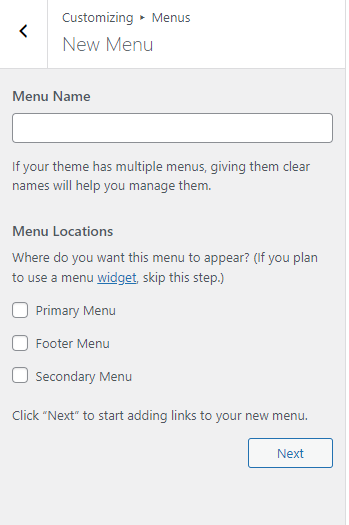
Here you can then:

  1. Set the name to your menu within the “Menu Name” field
  2. Specify a location to your menu

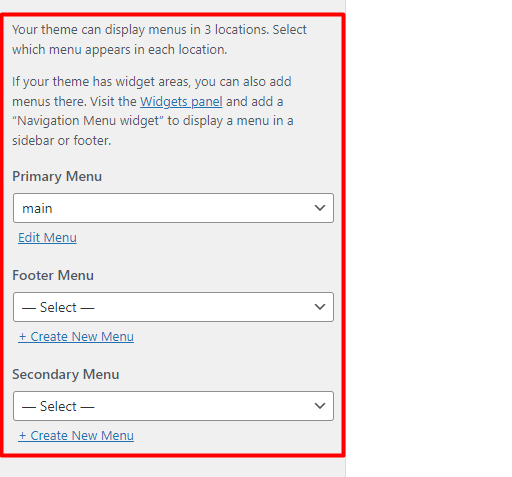
Stax theme provides three main menu sections. These are:

  • Primary Menu: This serves as the main menu within your website
  • Footer Menu: This is a menu set to be rendered within the footer section of your website
  • Secondary Menu: This menu is meant to be rendered below the header items but the theme provides enough flexibility to set it in any other section of your preference

On the next screen, you will then need to add your desired menu items.
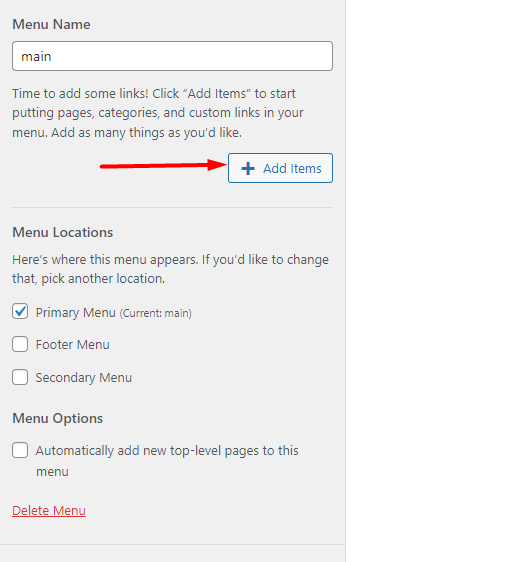
Within this screen, it does also provide an option “Automatically add new top-level pages to this menu”. When enabled, all new parent pages will be added to the menu automatically.

Once the above is done, publish your changes.

View All Locations
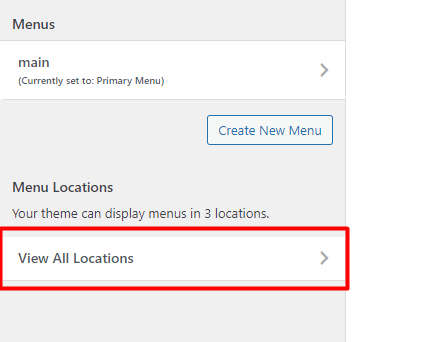
The “View All Locations” section enables you to assign a menu to either of the three mentioned menu sections that the theme provides.
What are your Feelings

Share This Article :

  • Facebook
  • X
  • LinkedIn
  • Pinterest
Still stuck? How can we help?

How can we help?

Updated on March 9, 2022
Stax – MiscellaneousStax – Export/Import
Table of Contents
  • Overview
  • Creating a new Menu

Stax Theme | Made with ❤️ by StaxWP