
• Products
    • BuddyBuilder
    • Visibility Logic for Elementor
    • Woo Addons Upcoming
    • Enhanced Addons Upcoming
  • Blog
  • My Account
  • Products
    • BuddyBuilder
    • Visibility Logic for Elementor
    • Woo Addons Upcoming
    • Enhanced Addons Upcoming
  • Blog
  • My Account

Getting Started

  • Requirements For Stax Theme
  • How to Install the Stax Theme Via WordPress
  • Stax Recommended Plugins
  • How to Install the Stax Theme via FTP
  • Setting up a Stax Child Theme

FAQ

  • Image Sizes
  • How to utilize Visibility Logic plugin within the theme
  • How Can I update the theme

Customizer Settings

  • Stax – Colors
  • Stax – Typography Options
  • Stax- Header
  • Stax – Footer
  • Stax – Layout
  • Stax – Single Post
  • Stax- Single Page
  • Stax – Performance
  • Stax – Archive Listing
  • Stax – 404 Page
  • Stax – Miscellaneous
  • Stax – Menus
  • Stax – Export/Import
  • Stax – Additional CSS
  • Stax- Widgets

Posts and Pages

  • Creating Posts and Pages
  • Stax Options
  • Adding Elementor Templates

How to Guides

  • How to Create and restore Backups to your Website
  • How To Add Custom Fonts

Translation

  • How to Translate the theme with Loco Translate
  • Theme Translation Basics
  • How to Translate the theme with Poedit
  • How to Translate the theme with WPML
  • Multilingual site setup with WPML

Speed and Performance

  • How to Optimize For Speed and Performance

Troubleshooting

  • Basic Troubleshooting
  • Submitting Support Tickets
  • Home
  • Docs
  • Stax Theme
  • Customizer Settings
View Categories

Stax – Export/Import

< 1 min read

Overview

The Export / Import functionality is provided by the Customizer Export/Import plugin. You hence need to first install the plugin within your website.

Once installed, you will have an Export / Import section within the Appearance > Customize section.
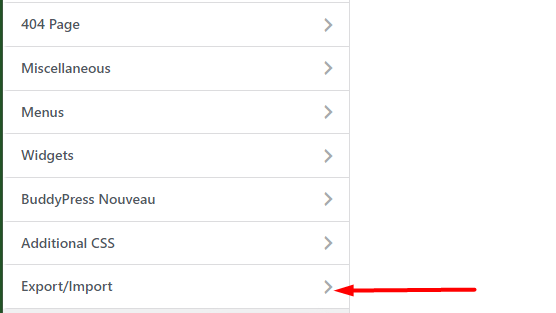
The option enables you to export or import your customizer settings directly within the customizer interface.

Exporting Customize Settings

In order to export your customize settings, you will need to navigate to the Appearance > Customize > Export / Import section and click on the “Export” button.
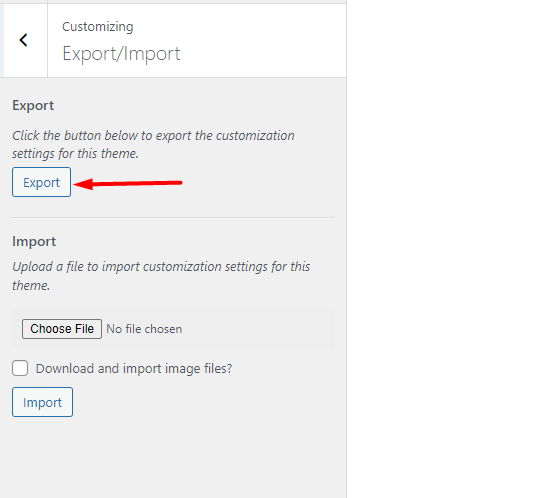
Once this is is done, a file with your settings is downloaded. The file will be named based on the theme name and can only be used to import settings to a WordPress installation with the same theme.

Importing Customize Settings

Importing customizer settings is achievable from the Appearance > Customize > Export/Import > Import section
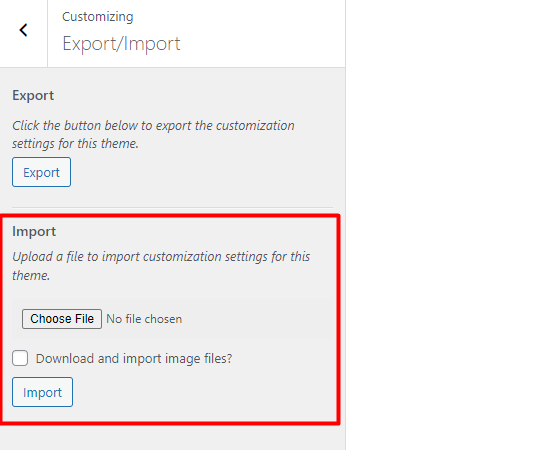
Here, you can upload your export file by clicking on the “choose file” button, enable the option “Download and import image files?” and click on the “import” button.

What are your Feelings

Share This Article :

  • Facebook
  • X
  • LinkedIn
  • Pinterest
Still stuck? How can we help?

How can we help?

Updated on March 9, 2022
Stax – MenusStax – Additional CSS
Table of Contents
  • Overview
    • Exporting Customize Settings
    • Importing Customize Settings

Stax Theme | Made with ❤️ by StaxWP