
BuddyBuilder troubleshooting
Most BuddyBuilder problems come from a template that is not assigned or not published, or from a widget used outside the page it was made for. Find your symptom below; each entry says what you see, why it happens and how to fix it.
Template does not show on the BuddyPress page
Section titled “Template does not show on the BuddyPress page”What you see: the member profile, group profile, a directory or the activity page still has the default BuddyPress layout, or only you (the administrator) see the new design.
Why: BuddyBuilder replaces a BuddyPress page only when a template is selected for it, that template has Elementor content, and the template is published.
Fix: check these in order.
- Go to BuddyBuilder > Settings. The box of the page (Member Profile, Members Directory, Group Profile, Groups Directory, Site-Wide Activity) must have your template selected, not – BuddyPress Default –. Click Save.
- Click Edit current and make sure the template is not empty. An empty template is ignored and the default BuddyPress layout is used.
- Publish the template in Elementor. A draft is shown only to users who can edit it, so visitors get an empty area. A password-protected or trashed template is never shown.
- For group templates, the BuddyPress User Groups component must be active. For the activity template, the Activity Streams component must be active. Check Settings > BuddyPress > Components.
- Clear your caches: the page cache of your caching plugin or host, and the Elementor CSS files (Elementor > Tools).
If you have no templates yet, import the starter templates or follow Create a custom member profile.
Profile widgets are empty or cause an error on a normal page
Section titled “Profile widgets are empty or cause an error on a normal page”What you see: a member profile or group profile widget (Avatar, Name/Username, Navigation, Content and so on) shows nothing, or the page fails with an error, when the widget is placed on a regular page.
Why: these widgets read the member or group that BuddyPress is currently displaying. A regular page has no displayed member or group, so there is nothing to output.
Fix: use member profile widgets only in the Member Profile template and group profile widgets only in the Group Profile template. On regular pages, use the widgets of the BuddyBuilder General category: Members List, Groups List and Activity List.
Members List or Groups List items look squeezed on a normal page
Section titled “Members List or Groups List items look squeezed on a normal page”What you see: with BuddyBuilder Pro, a Members List or Groups List widget that uses a custom item template (Member Item Template or Group Item Template) looks right in the Elementor editor, but on the front end of a regular page the items are squeezed or misaligned and the column setting seems ignored.
Why: this is a known open issue. It is not fixed in Pro 1.7.2.
Fix: there is no confirmed workaround yet. Contact support with a link to the page, so we can look at your case and let you know when the fix is released.
Ads, Birthday or Link Preview do not show on the front end
Section titled “Ads, Birthday or Link Preview do not show on the front end”What you see: with BuddyBuilder Pro 1.7.0 or 1.7.1, the Ads, Birthday and Link Preview modules are enabled in BuddyBuilder > Modules, but ads, the birthday widget and link previews do not appear on the site.
Why: a bug in these two versions loads the modules only in the WordPress admin. It is fixed in Pro 1.7.2.
Fix: update BuddyBuilder Pro to 1.7.2 or newer. Updates need an active license: see License and account.
Displayed User XProfile Field tag is empty
Section titled “Displayed User XProfile Field tag is empty”What you see: the Pro dynamic tag Displayed User XProfile Field shows a value in the Elementor editor but is empty on the front end, for example in a WooCommerce product template or on a regular page.
Why: this is by design. The tag reads the member whose profile is being displayed (or the current member inside a members loop). Outside BuddyPress member pages there is no displayed member, so the tag has no value. In the editor it previews with your own profile data, which is why it looks filled there.
Fix: use the tag in the Member Profile template or in a member item template. The same applies to the other “Displayed User” tags (Displayed User XProfile URL Field, Displayed User Avatar, Displayed User Cover image).
Critical error on BuddyPress pages
Section titled “Critical error on BuddyPress pages”What you see: with BuddyBuilder 1.9.2 or older, the members, groups or activity pages (and sometimes other pages of the site) stop with “There has been a critical error on this website”. The PHP log shows an array_map() error in core/hooks/BuddypressHooks.php.
Why: BuddyBuilder reads the BuddyPress directory pages from the bp-pages option. When that option is missing, for example after a database migration or a BuddyPress reset, older versions stop with a fatal error. It is fixed in 1.9.3, which also skips directory pages that were deleted and recognises directory pages placed under a parent page.
Fix: update BuddyBuilder to 1.9.3 or newer.
PHP warning: Undefined array key content_display
Section titled “PHP warning: Undefined array key content_display”What you see: with BuddyBuilder 1.9.2 or older, the PHP log or the page shows Warning: Undefined array key "content_display", pointing at the Members or Groups directory filters widget.
Why: the Filters widget reads a setting that was never saved on that template. It is a harmless notice: the filters work normally. It is fixed in 1.9.3.
Fix: update BuddyBuilder to 1.9.3 or newer. Until then, turn off the display of PHP errors on the live site (WP_DEBUG_DISPLAY set to false in wp-config.php).
Cover image does not show in profiles
Section titled “Cover image does not show in profiles”What you see: a member uploaded a cover image, but the profile built with BuddyBuilder shows no cover.
Why and fix: check these three things.
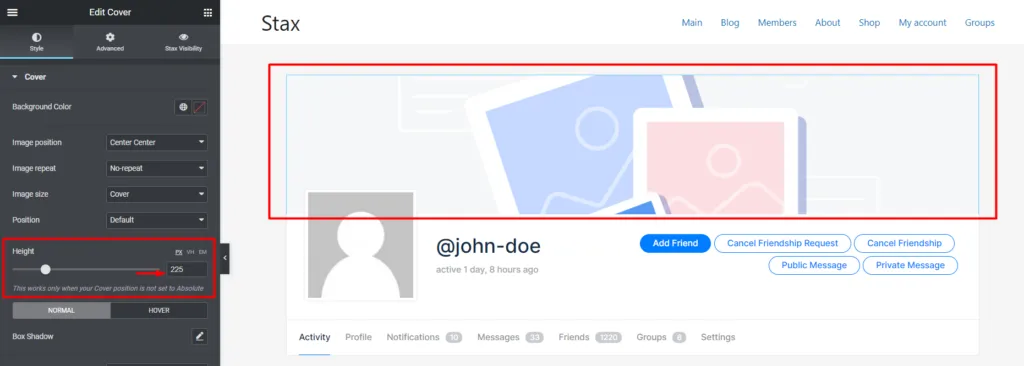
- The template has a Cover widget. The cover is only output by the Cover widget, so add it to the Member Profile template (and to the Group Profile template for group covers).
- The Cover widget has a height. The cover is a background image, so the widget needs a height to be visible. Select the widget, open Style > Cover and set Height. The Height control is hidden when Position is set to Absolute: switch Position back to Default to set it.
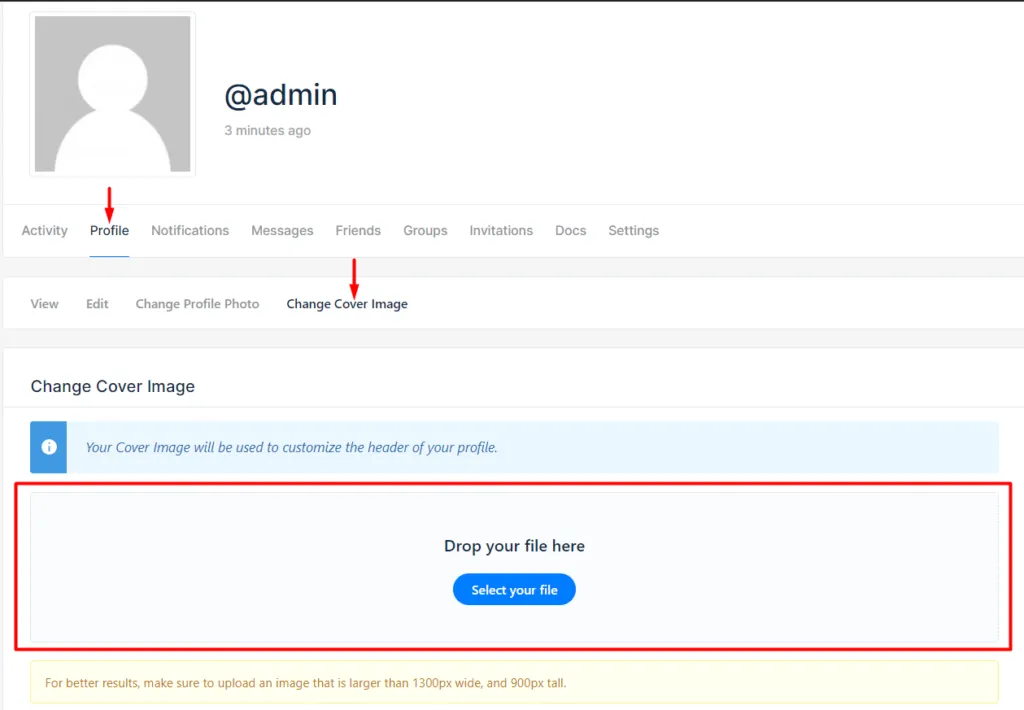
- The member has a cover image. Members upload it from their profile, under Profile > Change Cover Image. If that tab is missing, enable Allow registered members to upload cover images in Settings > BuddyPress > Options.
See Member profile widgets for all Cover options.
Get help
Section titled “Get help”- BuddyBuilder Pro: open a ticket from the support page. Pro customers get priority support.
- BuddyBuilder (free): post in the WordPress.org support forum.
Include these details so we can reproduce the problem quickly:
- WordPress and PHP versions
- Elementor version (and Elementor Pro, if you use it)
- BuddyPress or BuddyBoss Platform version
- BuddyBuilder and BuddyBuilder Pro versions
- The active theme
- The steps that lead to the problem, the page URL and a screenshot or the exact error message
Before you write, check that you run the current versions: see Plugin requirements and the BuddyBuilder changelog.